I Built 'Source Wars' Agent to Understand Claude's Agent Harness
Over the holidays, i had been playing around with Claude Code (a TUI coding agent), but unlike other IDE based / TUI based coding agents, Claude Code felt different. It doesn’t just generate text—it operates, it showed immense results. I kept wondering: how much of that is Claude Sonnet / Opus (the LLM model) vs. the scaffolding around it? Since Claude opensourced the Claude Agent SDK , which is the same agent harness that powers Claude Code, I saw an opportunity to answer that question by building on it myself.
The Test Bed: Source Wars (Multi Agent Research System)
To properly evaluate the harness, I needed a project complex enough to stress-test every component. I settled on a Research Synthesis Agent—a system that:
- Takes a technical question
- Spawns multiple researcher subagents to explore different angles
- Uses custom tools to search documentation, fetch web pages, analyze code
- Has a synthesizer agent that resolves contradictions and produces a coherent report
- Includes safety hooks and human approval gates
Agent Harness
What is an Agent Harness? Simply put, Agent harness is a model wrapper that is batteries included, like the capability to execute code / command, search for files, search the web, tool calls etc. Each major frontier company has its own opinionated views and its own Agent harnesses (OpenAI SDK, Claude Agents SDK etc)
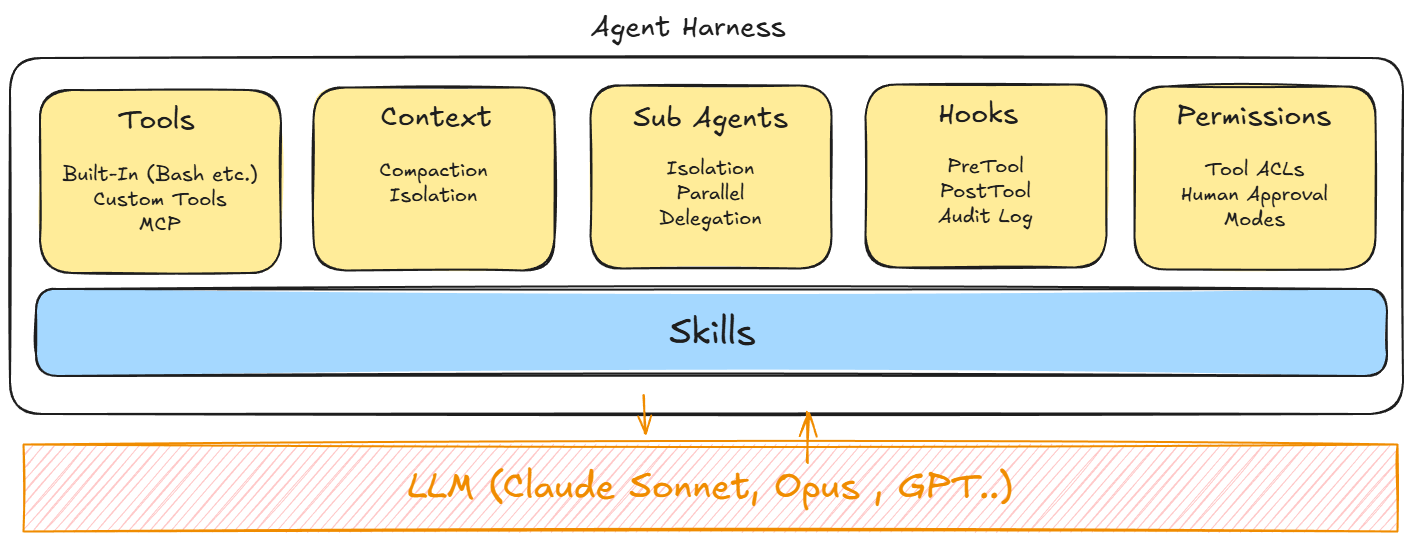
I will be covering each of these components of the harness.
Tools
Tools are nothing but special functions that does an operation for the LLM, LLMs are notified of different tools (along with their description) and their capabilities during initialization which it can decide to use during the session. The operations done by tools might be as simple as reading a file or as complex as writing bash scripts to parse and calculate a csv.
Built-in Tools
The SDK ships with tools that mirror a developer’s workflow:
| Tool | What it does |
|---|---|
| Read | Read any file in the working directory |
| Write | Create new files |
| Edit | Make precise edits to existing files |
| Bash | Run terminal commands, scripts, git operations |
| Glob | Find files by pattern (**/*.ts, src/**/*.py) |
| Grep | Search file contents with regex |
| WebSearch | Search the web for current information |
| WebFetch | Fetch and parse web page content |
| AskUserQuestion | Ask the user clarifying questions with multiple choice options |
Custom Tools
When built-in tools aren’t enough, you can create MCP servers:
from claude_agent_sdk import tool, create_sdk_mcp_server

@tool("search_docs", "Search official documentation", {"query": str, "source": str})
async def search_docs(args: dict) -> dict:
    # Custom implementation
    results = await doc_search_api(args["query"], args["source"])
    return {"content": [{"type": "text", "text": json.dumps(results)}]}

docs_server = create_sdk_mcp_server(name="docs", tools=[search_docs])
What I learned:
- In-process MCP is a game-changer. No subprocess spawning, no IPC overhead. The @tool decorator feels native.
- Tool descriptions are prompts. Claude decides when to use a tool based on its description. Vague description = tool never called.
- Tools are automatically namespaced as mcp__servername__toolname internally.
- Return format matters. The {“content”: [{“type”: “text”, “text”: “…”}]} structure is required.
- LLM model used matters, Reasoning / Thinking models like Claude Sonnet (4.5) or Claude Opus (4.5) handled complex tools and ambiguous queries better; they handle multiple tools better and seek clarification when needed.
When to Use What
| Scenario | Recommendation |
|---|---|
| File operations | Built-in tools (Read, Write, Edit) |
| Shell commands | Built-in Bash (with hooks!) |
| External APIs | Custom MCP tool (In-Process MCP) |
| Complex integrations | External MCP server |
| Quick experiments | Built-in tools only |
Context
Agents that explore, search, and iterate accumulate context fast. A research agent might read 50 files and fetch 20 web pages. Without management, you hit token limits and the agent crashes.
The Claude agent harness tackles this by Automatic compaction and Sub agent context isolation.
Automatic compaction: When context approaches the limit, the harness summarizes earlier messages, preserving essential information while freeing tokens. Subagent isolation: Each subagent operates in its own context window. A researcher subagent might explore extensively, but only returns a summary to the orchestrator.
┌──────────────────────────────────────────────┐
│              ORCHESTRATOR CONTEXT            │
│                                              │
│  • Task description                          │
│  • Researcher 1 summary                      │
│  • Researcher 2 summary                      │
│  • Synthesizer output                        │
└──────────────────────────────────────────────┘
              ▲                     ▲
              │                     │
┌──────────────────────┐  ┌──────────────────────┐
│      RESEARCHER 1    │  │      RESEARCHER 2    │
│     (own context)    │  │     (own context)    │
│  • 30 files          │  │  • 20 URLs           │
│  • 15 searches       │  │  • 10 files          │
└──────────────────────┘  └──────────────────────┘
What I Learned
Compaction is invisible until you need it. For short tasks, you never notice. For my research agent doing deep dives, it kicked in regularly. The summaries were good—I couldn’t tell when it happened by looking at output quality.
Subagent isolation is the key architectural pattern. This is how you build agents that scale. Don’t let every exploration pollute the main context. Delegate to subagents, receive summaries.
You can influence compaction through prompt design. Asking agents to “summarize your findings in 3 bullet points before returning” helps the orchestrator stay lean.
Subagents
The Mental Model
Subagents aren’t just “multiple prompts.” They’re isolated agent instances with:
- Their own context window
- Their own tool permissions
- Their own system prompt
- The ability to run in parallel
Programmatic Agent definition (recommended for SDK apps):
agents = {
    "deep-researcher": {
        "description": "Thorough researcher for complex topics. Use when depth > speed.",
        "prompt": "You are a meticulous researcher...",
        "tools": ["Read", "Grep", "Glob", "WebSearch", "WebFetch"],
        "model": "opus"
    },
    "quick-scanner": {
        "description": "Fast scanner for surface-level information. Use when speed > depth.",
        "prompt": "You are a fast information scanner...",
        "tools": ["Grep", "Glob", "WebSearch"],
        "model": "sonnet"
    }
}
Filesystem-based (.claude/agents/):
---
name: deep-researcher
description: Thorough researcher for complex topics
tools: Read, Grep, Glob, WebSearch, WebFetch
model: opus
---

You are a meticulous researcher...
What I Learned
- The
descriptionfield plays a huge role in the routing decision. Claude reads all subagent descriptions and decides which to invoke based on the task.# Bad: Claude might not know when to use this "description": "A research agent" # Good: Clear triggers for invocation "description": "Deep researcher for technical topics. Use when the question requires reading documentation, source code, or multiple authoritative sources. NOT for quick factual lookups." - Parallel execution is implicit. If the orchestrator decides to invoke multiple subagents for different aspects of a task, they run concurrently. I didn’t have to code this—it emerged from the task structure.
- Explicit sub agent execution can be achieved by nudging it in the prompt. eg.
"Use the deep-researcher agent for researching complex topics" - Model selection per subagent based on your use-case or strategy. I used Opus for synthesis (needs reasoning) and Sonnet for scanning (needs speed). The cost difference is significant.
Hooks
Hooks intercept tool execution at two main points:
- PreToolUse: Before a tool runs (can allow, deny, or ask for approval)
- PostToolUse: After a tool runs (for logging, auditing, transformation)
For people coming from Java / Spring Boot, the best mental model to think of this is using filters like WebFilter
Hooks don’t steer Claude’s reasoning. I initially thought I could use hooks to guide Claude toward certain tools or strategies. That’s not what they do. They intercept execution, not planning. If you want to change what Claude decides to do, modify the system prompt. Hooks only control what actually happens when Claude tries to act.
An example that i found useful is to use hooks to prevent un-intended destructive commands being executed and to log input/output of all tool calls done by the agent.
async def safety_hook(input_data, tool_use_id, context):
    if input_data["tool_name"] == "Bash":
        command = input_data["tool_input"].get("command", "")
        if "rm -rf" in command:
            return {
                "hookSpecificOutput": {
                    "permissionDecision": "deny",
                    "permissionDecisionReason": "Blocked dangerous command"
                }
            }
    return {}  # Allow by default

async def audit_log(input_data, tool_use_id, context):
    log_entry = {
        "timestamp": datetime.utcnow().isoformat(),
        "tool": input_data["tool_name"],
        "input": input_data["tool_input"]
    }
    append_to_log(log_entry)
    return {}

# Set up hooks for tracking
    hooks = {
        'PreToolUse': [
            HookMatcher(
                matcher=None,  # Match all tools
                hooks=[safety_hook]
            )
        ],
        'PostToolUse': [
            HookMatcher(
                matcher=None,  # Match all tools
                hooks=[audit_log] #used to log all tool calls
            )
        ]
    }
Permissions
The SDK offers 4 ACL modes:
| Mode | Behavior |
|---|---|
default |
Ask for approval on sensitive operations |
acceptEdits |
Auto-approve file edits, ask for others |
bypassPermissions |
Auto-approve everything (requires explicit opt-in) |
dontAsk |
Auto-deny tools unless explicitly allowed |
Tool-level Control
Beyond modes, you control exactly which tools are available:
options = ClaudeAgentOptions(
    allowed_tools=["Read", "Grep", "Glob"],  # Only these tools
    # OR
    disallowed_tools=["Bash", "Write"],  # Everything except these
)
Subagent-level tool control
Each subagent can be given specific tool accesses
agents = {
    "reader": {
        "tools": ["Read", "Grep", "Glob"],  # Read-only
    },
    "writer": {
        "tools": ["Read", "Write", "Edit"],  # Can modify
    }
}
What I Learned
- Start restrictive, expand as needed. I began with read-only tools and added writes only when required.
- Permissions + hooks = Fool Proof Defense. I used permissions for broad strokes (no Bash for this subagent) and hooks for fine-grained control (Bash allowed, but not rm -rf).
- Never use
allow_dangerously_skip_permissionsunless you explicitly need it. (Apart from CI/CD automation i can’t think of any other use cases for this)
Agent Skills
Agent Skills are a different primitive than subagents. While subagents are isolated execution contexts for delegation, Skills inject domain expertise into the current conversation.
The powerful pattern: subagents do isolated work, skills provide shared expertise.
Skills are defined as SKILL.md files in .claude/skills/ directories:
---
name: source-evaluation
description: >
  Framework for evaluating source credibility.
  Use when assessing whether a source should be trusted.
---

# Source Evaluation Framework

## The CRAAP Test
- Currency: When was this published?
- Relevance: Does it address the question?
- Authority: Who wrote it?
...
Progressive Loading
- Startup: Only skill names and descriptions load into context
- Trigger: When Claude recognizes relevance, it loads the full SKILL.md
- Execution: If the skill references scripts, Claude runs them
This means you can have dozens of skills without bloating context—only relevant ones load.
I built 3 skills for my research system.
| Skill | Purpose |
|---|---|
research-methodology |
Systematic approach to exploring topics |
source-evaluation |
Framework for assessing credibility |
citation-style |
Consistent citation formatting (with script) |
And this can be easily wired into your agent like below
# .claude/agents/doc-researcher.md
---
name: doc-researcher
description: Documentation researcher
tools: Read, WebSearch, WebFetch
skills: research-methodology, source-evaluation, citation-style
---
or programmatically in SDK by :
async def main():
    options = ClaudeAgentOptions(
        cwd="/path/to/project",  # Project with .claude/skills/
        setting_sources=["user", "project"],  # Load Skills from filesystem
        allowed_tools=["Skill", "Read", "Write", "Bash"]  # Enable Skill tool
    )
What I Learned
- The
descriptionfield is routing logic. Just like subagents, Claude decides when to use a skill based on its description. Write descriptions with trigger keywords. - Scripts are output-only. When a skill includes a Python script, Claude runs it and gets the output, but the script code never enters context. This is token-efficient for utilities like formatters.
- When defining the sub-agents programmatically there is no way to define which agents have access to which skills, while in markdown based subagents you can easily define it.
The Harness in Action : Source Wars (Multi Agent Research System)
The Architecture
┌─────────────────────────────────────────────────────────────┐
│                    RESEARCH ORCHESTRATOR                    │
│                                                             │
│   "What are the tradeoffs between RAG and fine-tuning?"     │
│                                                             │
│   ┌─────────────────┐  ┌─────────────────┐                  │
│   │ Doc Researcher  │  │ Web Researcher  │   (parallel)     │
│   │ (searches code, │  │ (searches web,  │                  │
│   │  docs, papers)  │  │  blogs, forums) │                  │
│   └────────┬────────┘  └────────┬────────┘                  │
│            │                    │                           │
│            └──────────┬─────────┘                           │
│                       ▼                                     │
│            ┌─────────────────────┐                          │
│            │    SYNTHESIZER      │                          │
│            │ (resolves conflicts,│                          │
│            │   produces report)  │                          │
│            └─────────────────────┘                          │
│                                                             │
│   Tools: WebSearch, WebFetch, Read, Grep, Glob              │
│   Hooks: Audit logging, URL approval, result truncation     │
│   Permissions: Researchers read-only, no file writes        │
└─────────────────────────────────────────────────────────────┘
This tests the harness well because the agent loop is exercised through multiple iterations of searching, reading, and refining; the tools layer is stressed with heavy use of WebSearch, WebFetch, Read, and Grep; context management is validated as researchers explore extensively and return summarized findings; subagents are utilized via three specialized agents with distinct prompts; hooks are engaged to audit all fetches and truncate large results; and permissions are enforced by ensuring researchers cannot write files
Overall Evaluation
What the Harness Gets Right
- The agent loop is production-quality. Error recovery, retry logic, context management—this is hard to build well, and the SDK does it.
- Subagent isolation is the right abstraction. It maps cleanly to how you’d design a multi-agent system. Context separation is handled for you.
- The tool system is comprehensive. Built-in tools cover most needs; custom MCP tools fill gaps elegantly.
- Permissions and hooks enable safe deployment. Defense in depth is possible and encouraged.
- Skills provide reusable expertise. Progressive disclosure is an elegant solution to context management for domain knowledge.
What Could Be Better
- Transparency into internal state. Although the SDK provides a way to track usage and token , I want to explicitly see current context usage, when compaction happens, why the loop stopped etc.
- Hook flexibility. Intercepting tool calls is useful, but I sometimes wanted to hook into planning/reasoning and also things like audit logging should be available out of the box.
- Subagent recursion. One level of delegation is limiting for some architectures.
- Skill trigger visibility. Hard to know when skills loaded without adding explicit logging.